
Ecommerce SEO: The Complete Guide to Ranking Collection, Category, and Product Pages
This guide covers the ecommerce SEO operating system behind:
- collection and category page growth
- product page quality
- faceted navigation control
- internal authority flow
- organic revenue measurement
A store owner checks revenue every Monday. Paid ads carry the number. Organic barely moves, even though the catalog keeps growing and the blog ships posts every week.
The CEO sees paid media doing all the heavy lifting. The CMO sees blog output going up. Finance sees acquisition cost getting worse.
The SEO problem is hiding inside the catalog.
When the site gets audited, the cause is rarely a missing article. It is the commercial architecture.
The collections are too broad. Filters spawn duplicate URLs. Product descriptions are pasted from suppliers. Pagination hides products from crawlers. Internal links point everywhere except the pages that make money.
Most stores in this position do not have a traffic problem. They have a structure problem, and adding content on top of a broken structure produces more waste, not more revenue.
Ecommerce SEO is the process of making your online store visible for the searches shoppers use before they buy: product searches, category searches, comparison searches, use-case searches, review searches, and buying-guide searches.
By the end of this guide, your team should know which URLs to fix, which collections to build, which pages to remove, and which reports prove whether organic search is producing revenue.
What Is Ecommerce SEO?
Ecommerce SEO is the work of improving an online store's organic visibility so shoppers can discover, evaluate, and buy products through search engines and AI-assisted search.
It is wider than most teams treat it. Product descriptions, title tags, image compression, and an SEO app are pieces of the work, not the work itself.
The full scope includes category architecture, collection-page strategy, product-page optimization, faceted navigation control, canonicalization, pagination, schema, internal linking, content strategy, link acquisition, product feed alignment, revenue tracking, and AI search visibility.
What ecommerce SEO actually controls
Stripped to its function, ecommerce SEO decides:
- Which commercial pages exist
- Which URLs Google can crawl
- Which URLs Google can index
- Which pages receive internal authority
- Which products are discoverable
- Which collections match real demand
- Which product data search and AI systems can trust
- Which pages produce revenue
- Which pages create index bloat
That is a control system, not a content checklist. The job is deciding what to build, what to protect, and what to remove.
The most valuable pages on an ecommerce site are usually not blog posts. They are collection pages, category pages, subcategory pages, and high-intent product pages, because those pages match transactional demand and that is where revenue concentrates.
A CMO does not need another dashboard showing organic sessions. They need to know why most non-brand demand is landing on competitors' collection pages, which pages should exist, which should be removed, and which should receive authority first.
The rest of the work is sequencing. Fix the URLs Google should not see, strengthen the pages shoppers should find, and route authority toward the pages that can produce orders.
Why Ecommerce SEO Matters to Revenue
Ecommerce SEO matters because it captures demand that already exists.
A shopper searching for "oak dining table," "waterproof hiking boots," or "best office chair for back pain" is already describing a purchase. The only question is whether your store has the right page for that demand.
If the answer is no, the traffic goes to a marketplace, a competitor's collection page, or a publisher's buying guide.
That is the commercial problem. The store may have the products, the inventory, and even better pricing, but if the category architecture does not match how shoppers search, the demand lands somewhere else.
A blog post can help a shopper understand what to buy. A collection page is where that shopper compares options. A product page is where they make the purchase. So the commercial catalog comes first, and supporting content, technical fixes, internal links, structured data, and link acquisition all exist to make those revenue pages easier to find, understand, and buy from.
Paid search and paid social scale quickly, but they reset every time the budget resets. A collection page that earns rankings keeps producing product discovery without paying for every click, and that gap matters more as acquisition costs climb and teams are pushed to protect margin.
Search is also no longer the only place discovery happens. Salesforce's Connected Shoppers research reports that 53% of shoppers now discover products on social platforms, up from 46% in 2023, and that three in four retailers expect AI agents to be essential by 2026. Ecommerce SEO still starts with search, but the clean product data, reviews, schema, and category clarity it produces are what feed discovery across those other surfaces too.
Why Ecommerce SEO Works Differently from Other SEO
Ecommerce SEO is different because the website is not just a marketing site. It is a catalog, a merchandising system, a product database, a search experience, and a checkout path all at once.
That creates problems most service websites never face.
A filter can create a new URL. A product variant can create a duplicate page. A discontinued product can become a dead end. A migration can break thousands of URLs overnight. A supplier description can appear on hundreds of other stores before it ever appears on yours.
This is why ecommerce SEO demands tighter control over crawlability, indexation, canonicalization, pagination, structured data, internal linking, and product-page quality. A service business may need twenty strong pages to cover its offers, while an ecommerce store can accidentally create twenty thousand weak URLs before anyone notices Google is spending time in the wrong part of the site.
The conversion target also changes what you optimize for.
| SEO type | Primary asset | Main search intent | Conversion |
|---|---|---|---|
| Ecommerce SEO | Collections, categories, products | Transactional and commercial | Purchase |
| B2B SEO | Service, solution, comparison pages | Problem and solution evaluation | Lead or demo |
| SaaS SEO | Product, use-case, comparison pages | Trial and product evaluation | Trial or signup |
| Local SEO | Profile, location, service pages | Nearby service intent | Call, booking, or visit |
Why ecommerce sites create SEO waste
The waste is predictable, and naming it is the first step to controlling it:
- Every filter can create a new URL
- Every variant can create a duplicate product page
- Every collection path can create another product URL
- Every discontinued product can become a dead end
- Every app can add scripts, templates, or duplicate metadata
- Every migration can break redirects and canonical logic
- Every supplier description can create duplicate content at scale
- Every blog post can become an orphaned asset
This is why ecommerce SEO is as much about subtraction as creation. Removing and controlling the wrong URLs often moves revenue faster than publishing new ones.
How Ecommerce Search Demand Works
Ecommerce demand is not a keyword list. It is a map of how shoppers describe products before they buy.
The same product gets searched a dozen ways. By category, by brand, by attribute, by use case, by audience, by price, by comparison, and by problem.
| Query type | Example pattern | Best page type |
|---|---|---|
| Category | [product category] | Category or collection |
| Subcategory | [attribute] [category] | Subcollection |
| Product | [brand] [model] | Product page |
| Use case | [product] for [use case] | Collection or guide |
| Buyer persona | [product] for [persona] | Collection |
| Attribute | [material/color/size] [product] | Filtered or static collection |
| Comparison | [product A] vs [product B] | Comparison guide |
| Best | best [product] for [use case] | Buying guide |
| Review | [product] review | Review or product page |
| Problem | how to solve [problem] | Supporting guide |
Knowing the page type is half the decision. The other half is knowing which demand deserves effort first.
| Demand type | Build priority |
|---|---|
| Category | High |
| Attribute plus category | High |
| Use case | Medium to high |
| Product model | High if stocked |
| Comparison | Medium |
| Problem query | Supportive |
| Broad informational | Low unless it supports collections |
The mapping becomes obvious once you apply it to a real catalog.
For a furniture store:
oak dining tablesbecomes a static collection.round dining tables for small spacesbecomes a collection or buying guide depending on the results page.how to choose a dining table sizebecomes a guide linking to the dining table collections.extendable vs fixed dining tablebecomes a comparison guide.[brand] [model] table reviewbecomes a product or review page.
For an outdoor gear store:
waterproof hiking bootsbecomes a collection.waterproof hiking boots for winterbecomes a collection if the results page supports it.how to clean hiking bootsbecomes a guide.leather vs synthetic hiking bootsbecomes a comparison guide.
The mistake is forcing every keyword into a blog post. A category query wants a category page, and answering it with an article hands the commercial ranking to a competitor.
Ecommerce SERP Reverse Engineering
Keyword tools tell you what people search. The search results page tells you what Google is willing to rank.
Those are different questions, and the second one decides what you build. Before creating a page for a target keyword, read the results page and classify it.
| SERP pattern | What it means |
|---|---|
| Retailer collections dominate | Build a collection |
| Product pages dominate | Optimize the product page |
| Marketplaces dominate | Go long-tail or build authority |
| Publishers dominate | Build a buying guide |
| Videos dominate | Add video or support with YouTube |
| Images dominate | Improve image SEO |
| AI Overview appears | Add extractable answer blocks |
| Shopping modules dominate | Align product feed and schema |
The classification comes from a repeatable read, not a guess:
- Search the keyword manually in a clean browser.
- Record the top ten result types.
- Mark every SERP feature present.
- Identify whether ranking pages are collections, products, guides, or marketplaces.
- Check page depth and content type.
- Check whether products are visible above the fold on the ranking pages.
- Check internal links pointing into each ranking page.
- Check the schema on ranking pages.
- Check backlinks to the ranking URLs.
- Decide the page type before you build anything.
This matters because effort spent on a page type Google has already rejected for a query is effort that never ranks. If marketplaces own the head term, the play is deeper long-tail collections and stronger authority rather than a head-on fight. If an AI Overview is present, the page needs definitions, specs, comparisons, and FAQs that are easy to extract and verify.
Ecommerce Keyword Research and Page Mapping
Ecommerce keyword research should produce a page map, not a spreadsheet of search volumes.
Semrush frames ecommerce keyword research around product and category relevance with commercial and transactional intent, and Ahrefs emphasizes using research to find subcategory opportunities that match how shoppers actually search rather than the broad terms a store assumes.
The output tells your team which collections to build, which product pages to rewrite, which filters to control, and which guides deserve a brief.
Work through these buckets and assign each term to a page type.
Product-type keywords: [product category], [product type], [brand] [product type]
Attribute keywords: [color] [product], [material] [product], [size] [product], [feature] [product]
Use-case keywords: [product] for [activity], [product] for [problem], [product] for [environment]
Buyer and persona keywords: [product] for beginners, [product] for professionals, [product] for small spaces, [product] for businesses
Commercial modifiers: best, top rated, affordable, premium, luxury, cheap, durable, lightweight, waterproof, eco-friendly, custom, bulk, and near me where location matters
Bottom-funnel modifiers: buy, sale, deals, discount, free shipping, in stock, online, reviews, comparison
The buckets resolve into a working map.
| Keyword group | Intent | Page type | Action |
|---|---|---|---|
[category] | Transactional | Main collection | Optimize |
[attribute] [category] | Transactional | Static collection | Build |
[product] for [use case] | Commercial | Collection or guide | SERP check |
best [product] | Commercial | Buying guide | Build |
[brand] [product] | Transactional | Brand collection | Build if stocked |
[model] review | Bottom funnel | Product or review | Optimize |
Worked example
Keyword: waterproof hiking boots
Intent: Category
Page: /collections/waterproof-hiking-boots/
Action: Build static collection

Keyword: waterproof hiking boots for winter
Intent: Use case
Page: /collections/winter-waterproof-hiking-boots/ or guide depending on SERP
Action: SERP check, then build

Keyword: how to clean waterproof hiking boots
Intent: Informational support
Page: /blog/how-to-clean-waterproof-hiking-boots/
Action: Build guide, link to waterproof hiking boots collection

Keyword: leather vs synthetic hiking boots
Intent: Comparison
Page: /blog/leather-vs-synthetic-hiking-boots/
Action: Build comparison, link to material collections
Prioritize by money, not volume
A CMO cares less about search volume and more about which page makes money fastest. Score every opportunity across these factors:
- Revenue potential
- Search intent
- Current ranking gap
- Product availability
- Margin
- Inventory stability
- SERP difficulty
- Link requirement
- Template readiness
- Internal linking opportunity
A high-volume term with thin margin, unstable stock, and a marketplace-dominated results page is a worse bet than a mid-volume attribute collection with strong margin and a winnable results page. The map should rank the second one first.
Building this from scratch is the kind of work most teams hand off, and a keyword research engagement that ends in a page map is far more useful than one that ends in a volume sheet.
The Collection-First Ecommerce SEO Framework
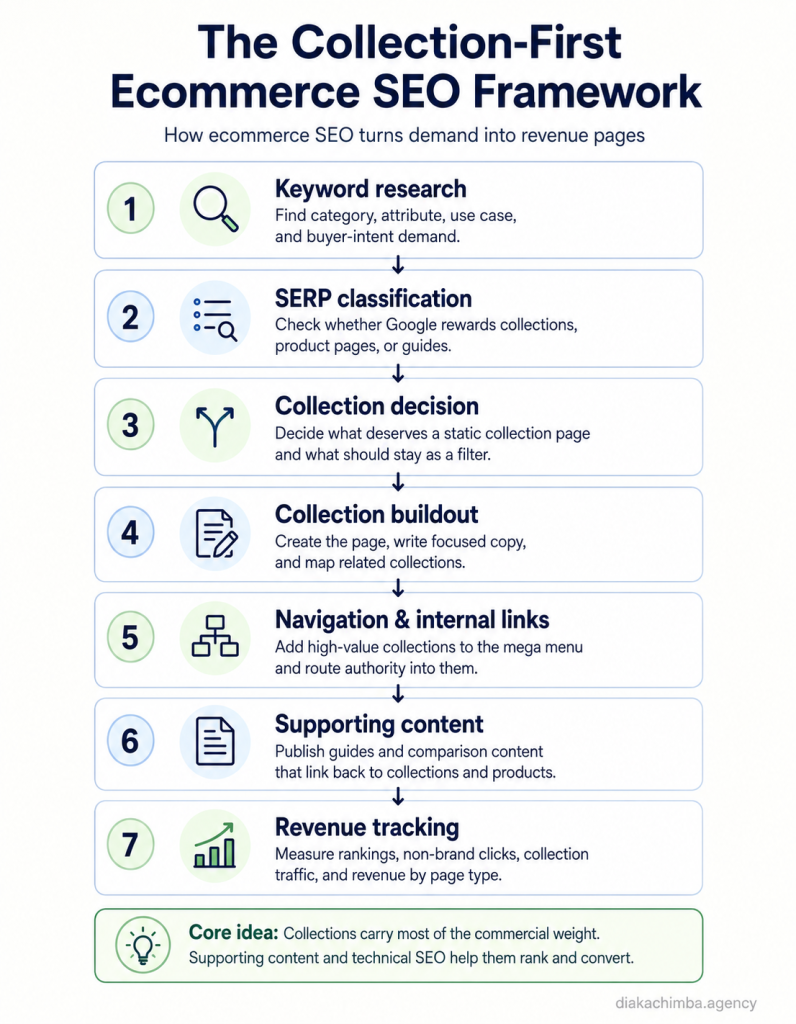
Collection pages are usually the single most valuable asset on an ecommerce site, and they should be the primary growth engine.
Most shoppers do not search for exact product names. They search by category, attribute, use case, problem, price point, and preference, which is exactly what a well-built collection page can rank for.
Picture a merchandising team that adds new products every month while the navigation barely changes. Six months later the store has hundreds of products living only inside broad categories and filters, and shoppers searching for specific use cases, materials, and sizes find no indexable page to land on. A store with 400 products and 12 collections is invisible for most of its commercial breadth.
The four core collection types
| Collection type | Example |
|---|---|
| Product-type | running shoes |
| Attribute | waterproof running shoes |
| Use-case | running shoes for trail running |
| Persona | running shoes for beginners |
Beyond these four, useful collections also form around brands, price points, compatibility, seasonal demand, and problem-and-solution angles. Each one exists because shoppers search for it, not because the catalog can technically generate it.
When a collection deserves a page
Build a collection when:
- It has search demand
- It maps to a real product set
- It carries commercial intent
- It can stay stocked
- It can have unique copy
- It can be internally linked
- It fits navigation or a related-collection module
- It can generate revenue
Do not build a collection when:
- It produces only one or two products
- It duplicates another collection
- It is a temporary merchandising idea
- It has no search demand
- It cannot be supported with unique copy
- It exists only because a filter exists
Avoiding collection cannibalization
The fastest way to waste a collection strategy is to build several pages that compete for the same intent:
/collections/waterproof-running-shoes/
/collections/trail-running-shoes-waterproof/
/collections/waterproof-shoes-for-running/
Those are one collection, not three. If two collection ideas answer the same buyer intent and the same results page ranks the same URLs, consolidate them into one canonical collection, and split only when the demand, the products, and the results page are clearly different.
Expose collections through a clean mega menu
A mega menu is a commercial navigation system, not a place to dump every page. It should surface the highest-value collections in groupings that match how buyers shop: shop by category, by use case, by brand, by material or feature, by audience, and by price or offer where it applies.
Route internal links between related collections
Internal links tell Google how the catalog connects and help shoppers refine intent. Parent collections link to child collections, child collections link to siblings, use-case collections link to product-type collections, and buying guides link into collections.
Product pages are the exception. They stay focused on conversion and avoid editorial links outward, which the product-page section covers in detail.
When this is done properly, the store stops relying on a few broad categories and starts ranking for the specific ways people actually shop.
How to Optimize Ecommerce Collection Pages
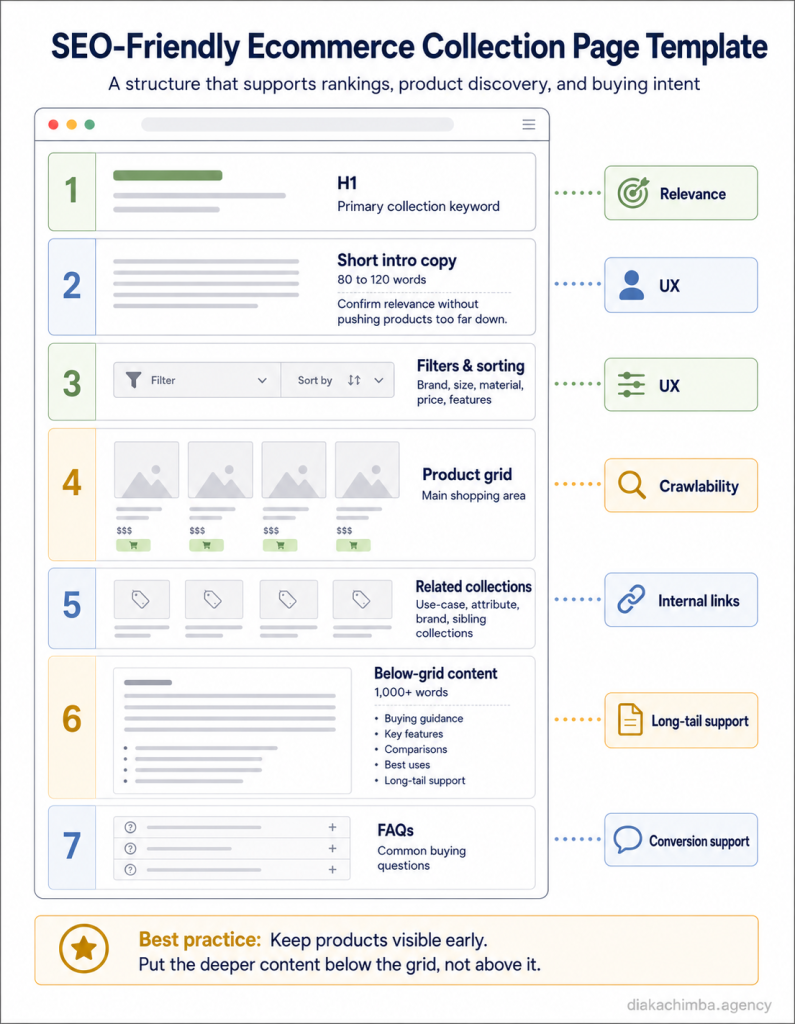
The collection page does the commercial heavy lifting, so the template matters more than any single page.
Collection page wireframe
H1: [Primary Collection Keyword]

Intro copy:
80 to 120 words explaining what the collection includes, who it is for, and the main buying angle.

Product grid:
Visible immediately on desktop and mobile.

Filters:
Product type, brand, size, color, material, price, rating, use case.

Related collections:
[Attribute collection]
[Use-case collection]
[Brand collection]
[Parent collection]

Below-grid content:
H2: How to choose [category]
H3: Best [category] for [use case]
H3: Key features to compare
H3: Materials, sizes, or compatibility
H3: Common buying mistakes
H3: Related collections
H2: FAQs
Title tags
Pair the commercial keyword with the store name and, where space allows, a value angle. A reliable formula is [Primary Keyword] | [Brand] or Shop [Primary Keyword] Online | [Brand].
Lead with buyer language, not clever phrasing.
H1s
Use one clear H1 that matches the main search intent. Skip the wordplay and use the term shoppers actually type.
Above-the-grid copy
Keep this to around 100 words. Its job is to confirm relevance, include the primary keyword, and name the key product types or attributes without pushing products too far down.
A working example:
> Shop waterproof running shoes built for wet roads, trails, and everyday training. This collection includes lightweight road shoes, grippy trail options, breathable waterproof uppers, and cushioned models for longer runs. Use the filters to compare size, brand, terrain, support level, and price.
Product grid visibility
Do not bury the grid under 1,500 words of intro copy. Ahrefs notes the tension between SEO content and shopping UX on category pages, and the workable middle ground is keeping the commercial experience intact while adding buying context where it does not block products.
Below-the-grid content
Add at least 1,000 words below the grid for categories with enough commercial depth, and make it useful rather than filler. The content should cover the category definition, buyer segmentation, feature comparison, use-case recommendations, material or spec explanation, sizing or compatibility guidance, price and value explanation, related collection links, and FAQs.
Related collections, FAQs, and schema
Link to adjacent collections using descriptive anchors. Add four to eight collection-specific FAQs that answer real buying questions and feed extractable answers to AI surfaces.
Use BreadcrumbList on collection pages, and apply ItemList only when implementation is clean. Product structured data belongs primarily on product pages, where Google supports richer result features when the markup is correct.
Collection content brief template
Hand this to a writer for every collection:
Primary keyword:
Secondary keywords:
Collection angle:
Target buyer:
Product types included:
Attributes to mention:
Use cases:
Related collections:
FAQs:
Internal links:
Products to feature:
Schema:
CTA:How to Optimize Ecommerce Product Pages
Product pages usually capture exact product demand, while collection pages capture broader commercial demand. Both matter but do different jobs, and the product page still ranks for exact-match, brand, model, SKU, review, image, and long-tail searches.
Ahrefs describes the product page as where the final purchase decision happens, which means SEO and UX have to work together rather than compete.
Required product page elements:
- Unique product title and unique description
- Clear specifications
- Price, availability, shipping, and returns
- Product images with descriptive alt text
- Reviews and ratings
- Product FAQs
- Variant handling
- Product schema and merchant listing eligibility
- Breadcrumbs and related products
- Trust signals and a clear call to action
Why duplicate descriptions fail
Copied manufacturer descriptions create duplication across the web, fail to differentiate the store, miss long-tail keywords, skip buyer objections, and give AI and search systems nothing unique to understand or cite.
This matters because duplicated supplier copy makes your store look interchangeable with every other retailer selling the same item, and a shopper comparing identical pages defaults to price or to whoever they already trust.
The product description rewrite framework
Rewrite priority products first, and rewrite them into a structure that answers the purchase decision:
- What it is
- Who it is for
- Key specs
- Use cases
- Differentiators
- Comparison points
- Objections answered
- Shipping, returns, and trust
- FAQ
Product page internal linking rule
Product pages should act as conversion endpoints. Avoid editorial links from product pages to blog posts or unrelated pages, and keep users focused on purchasing, choosing variants, reading reviews, checking shipping, and comparing related products.
Allowed on product pages:
- breadcrumbs
- variant links
- related products
- cross-sells
- upsells
- required policy and support links
- and category breadcrumb links
Avoid on product pages: blog links, informational detours, random collection links, and anything that pulls a ready buyer away from checkout intent.
Product Variant SEO
Variants are where product-page strategy quietly breaks. Color, size, bundle, multipack, subscription, and regional versions can each spawn a URL, and the wrong handling creates duplication or buries demand.
Before your team gives a variant its own URL, check whether shoppers actually search for that variant separately.
- Same intent, minor variation: consolidate under one product page with selectable options.
- Different search demand: consider a separate product page or a collection.
- Same product living across multiple collections: use canonical control so one URL holds the ranking.
- Variants with unique demand: give them unique copy, title, schema, and internal links.
A red running shoe and a blue running shoe are usually one page. A 4-foot and an 8-foot version of a product people search for by length may be two, because the demand and the buying decision differ.
When a variant earns its own page, treat it like any other indexable page: unique title, unique description, and a clear reason for a shopper to land there from search.
Out-of-Stock and Discontinued Product SEO
Stock changes are a constant revenue leak, because a product page that earned rankings and links does not stop mattering when inventory runs out.
The treatment depends on whether the product returns, whether a replacement exists, and whether the page has traffic or links worth keeping.
| Situation | Treatment |
|---|---|
| Temporarily out of stock | Keep the page live, show restock info, suggest related products |
| Discontinued with a direct replacement | 301 redirect to the replacement |
| Discontinued, no replacement, but has backlinks or traffic | Keep live with clear alternatives and related collection links |
| No traffic, no links, no replacement | 410, or redirect to the parent collection |
| Seasonal product | Keep live if it recurs, and update availability rather than removing it |
This matters because the mistakes here throw away money you already earned. Deleting a ranking page, redirecting everything to the homepage, or letting hundreds of out-of-stock pages sit as dead ends all discard accumulated authority that could route to a live, purchasable page instead.
Technical SEO for Ecommerce
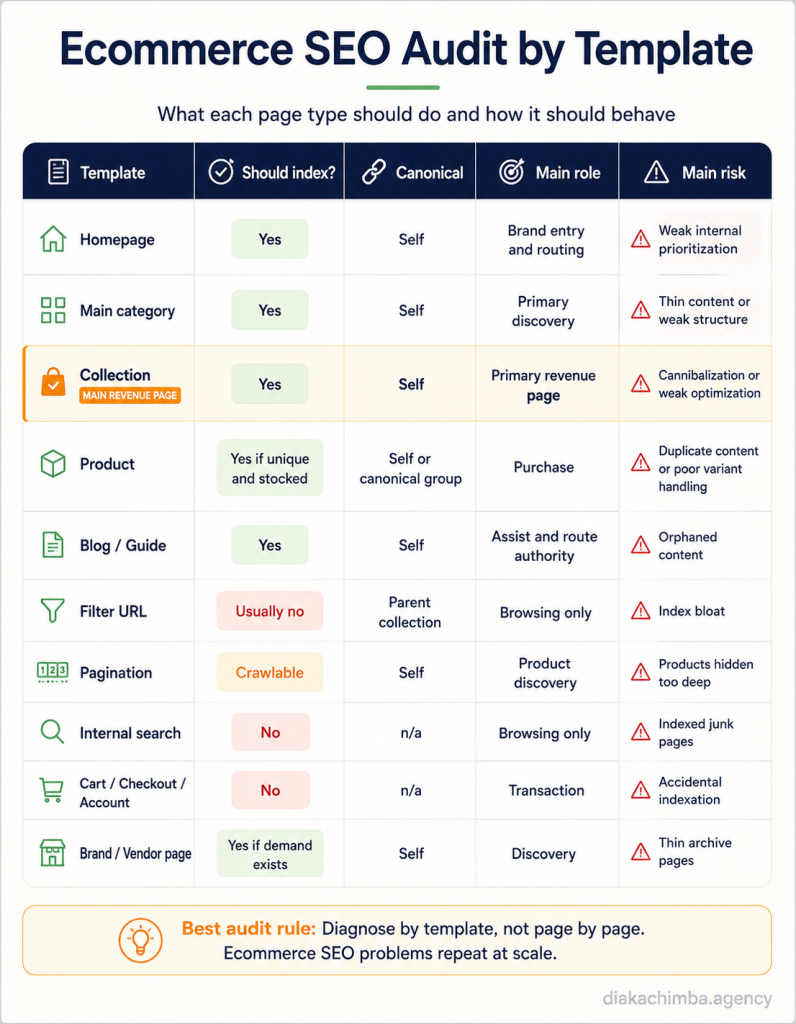
Technical SEO is the base layer. If Google cannot crawl, render, canonicalize, and index the right URLs, expanding content just produces more pages to waste crawl on.
This is why technical recovery comes before content expansion. Fix the foundation, then scale.
Crawl capacity is finite, and it matters more as the catalog grows. Google defines crawl budget as the number of URLs Googlebot can and wants to crawl, which means a large store has to make its useful URLs obvious and cut the waste from duplicates, parameters, and dead ends.
The ecommerce technical audit order
Run the audit in a fixed sequence so findings build on each other:
- Crawl the site with JavaScript rendering enabled.
- Export all indexable URLs.
- Compare indexable URLs against the XML sitemap.
- Compare indexed URLs from Search Console against crawlable URLs.
- Segment every URL by template.
- Identify crawl traps.
- Identify duplicate title, H1, and meta patterns.
- Check canonical behavior by template.
- Test pagination.
- Test faceted navigation.
- Review internal search URLs.
- Review product variant URLs.
- Review out-of-stock and discontinued pages.
- Check log files where available.
- Prioritize fixes by revenue page type.
Diagnose by template, not by page
Ecommerce problems repeat across thousands of URLs that share a template, so fixing the template fixes the problem at scale.
| Template | Common issue | Fix |
|---|---|---|
| Collection | Thin copy, weak canonicals | Add content, self-canonical |
| Product | Duplicate descriptions | Rewrite, add schema |
| Filter | Index bloat | Noindex, canonical, or block |
| Pagination | Products hidden | Crawlable links |
| Internal search | Indexed junk | Noindex |
| Discontinued product | Dead ends | Redirect or alternatives |
Default indexation rules
| URL type | Default |
|---|---|
| Main categories | Index |
| Search-demand collections | Index |
| Product pages | Index if unique and available |
| Paginated URLs | Crawlable |
| Sort URLs | Noindex or canonical |
| Internal search URLs | Noindex |
| Cart, checkout, account | Noindex |
| Thin tag pages | Noindex |
| Empty collections | Noindex or remove |
| Duplicate variants | Canonical or consolidate |
Canonicalization
Google warns that canonical tags should point to valid URLs with substantial duplicate overlap and should not be pointed from category or landing pages to unrelated content.
In ecommerce this matters for product variants, duplicate category paths, filtered URLs, tracking parameters, sort parameters, and platform-generated duplicates. Get canonicals wrong and you either hide pages you want ranked or consolidate pages that should stay separate.
Site speed and Core Web Vitals
Ecommerce speed problems are predictable: heavy product images, app and theme bloat, third-party scripts, review widgets, tracking pixels, and weak mobile performance. Address image optimization, lazy loading, and a CDN before chasing minor script tweaks.
Structured data
Cover Product, Offer, AggregateRating, Review, BreadcrumbList, Organization, and WebSite, plus shipping and return details. Google states that product markup can surface price, availability, reviews, shipping, and more across Search, Images, and Lens.
If your store carries duplicate URLs, broken redirects, canonical conflicts, or collection pages that are not ranking, the fastest first move is a technical ecommerce SEO audit to find out whether you have a content problem or an indexation problem.
Faceted Navigation SEO
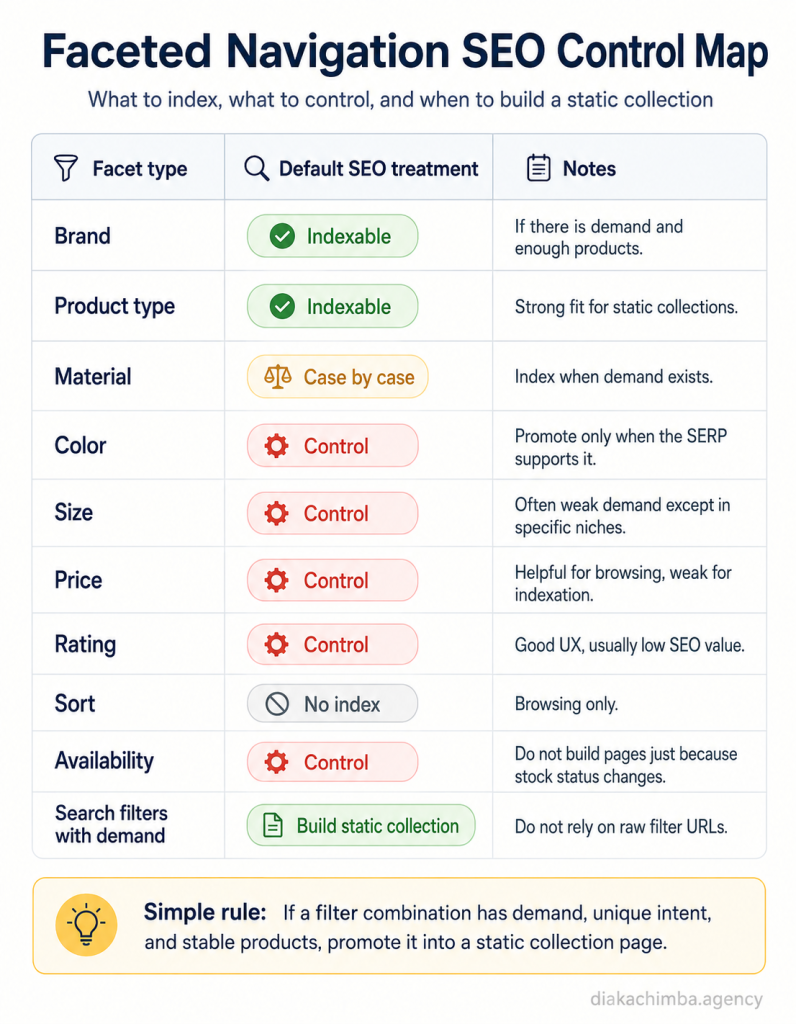
Faceted navigation is where most ecommerce index bloat is born, and it is also where this work can beat competitors, because the rules can be made precise.
This matters because Google can spend crawl time on filter URLs instead of the pages that produce revenue. Google's own faceted navigation documentation warns that filtered navigation can create large numbers of URLs and consume crawling resources when those URLs carry little or no search value, which is exactly why a store has to separate indexable collections from browsing-only filters.
The principle is short. Index pages that satisfy search demand, and control pages that exist only for browsing.
| URL type | Example pattern | SEO treatment |
|---|---|---|
| Main category | /collections/running-shoes/ | Index, self-canonical |
| High-demand filter | /collections/waterproof-running-shoes/ | Static collection, index |
| Low-demand filter | ?color=blue&size=10 | Noindex or canonical to parent |
| Sort parameter | ?sort=price-ascending | Canonical or noindex |
| Tracking parameter | ?utm_source= | Canonical or parameter handling |
| Internal search | /search?q= | Usually noindex |
| Pagination | /page/2/ | Crawlable, usually self-canonical |
| Empty filter page | filter URL with no products | Noindex, or 404/410 depending on case |
Not all facets are equal
The value of a facet depends on whether shoppers search for it.
| Facet type | SEO value |
|---|---|
| Brand | Often high |
| Product type | High |
| Material | Medium to high |
| Color | Usually medium |
| Size | Usually low unless category-specific |
| Price | Usually low |
| Rating | Low |
| Sort | None |
| Availability | Usually none |
Platform behavior to watch
- Shopify filters often create parameterized URLs that should not become indexable by default.
- Magento layered navigation can explode crawl paths.
- WooCommerce tags and attributes often create thin indexable archives.
- BigCommerce faceted URLs need careful crawl and index control.
Promoting a facet to a static collection
When a filter combination earns demand, graduate it to a real page:
- Identify filter combinations with search demand.
- Check the results page to confirm the page type.
- Build a static collection.
- Write unique metadata and copy.
- Add it to related-collection modules and navigation.
- Keep the dynamic filter version controlled.
- Monitor impressions and revenue.
Pagination SEO
Pagination decides whether deep products get discovered at all. Handled poorly, it hides inventory behind infinite scroll or buries products on uncrawlable pages.
Google allows pagination or incremental loading, but stores must ensure every product and page stays discoverable.
The working rules:
- Keep pagination links crawlable as real anchor tags, not JavaScript-only triggers.
- Avoid relying solely on infinite scroll for product discovery.
- Self-canonical paginated pages when each page is a distinct set.
- Surface important products and collections through internal links rather than depending on page depth.
- Consider a view-all page when the catalog size makes it sensible.
Ecommerce SEO Audit by Template
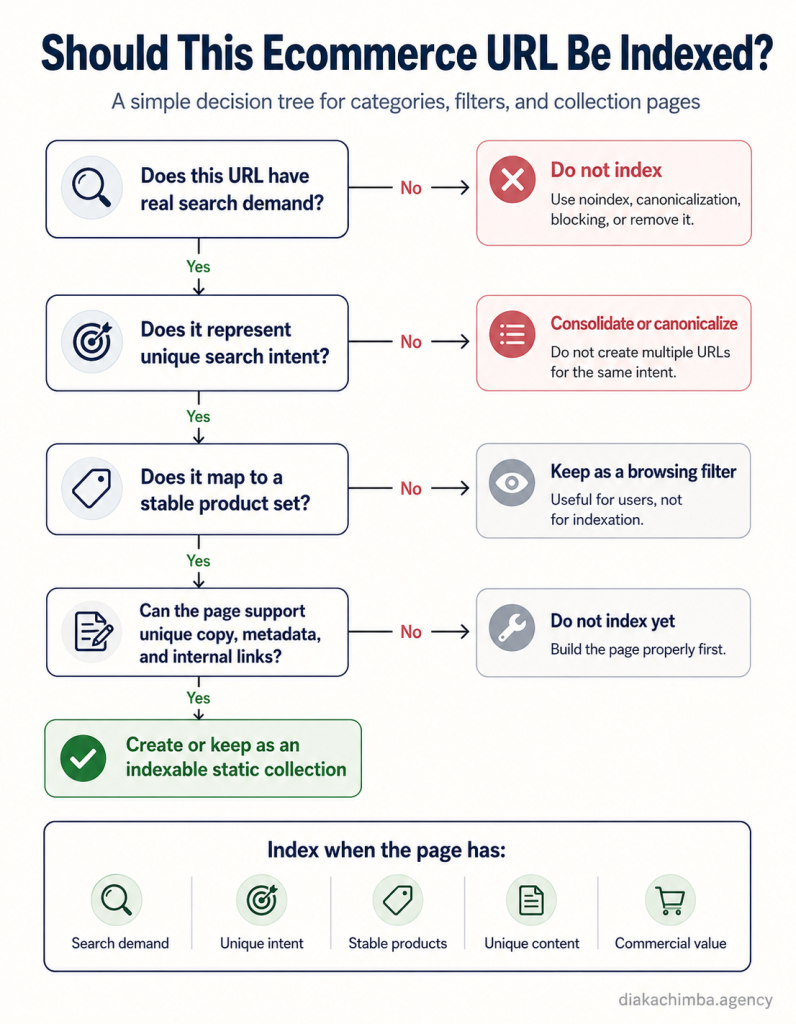
The most useful audit output is a per-template decision sheet, because it tells the developer, the content manager, and the merchandiser exactly how each page type should behave.
For each template, answer four questions:
- should it index
- what should its canonical be
- what internal links should it receive
- what is its conversion role
| Template | Index? | Canonical | Internal links in | Conversion role |
|---|---|---|---|---|
| Homepage | Yes | Self | Sitewide | Brand entry, routing |
| Main category | Yes | Self | Mega menu, breadcrumbs, guides | Primary discovery |
| Collection | Yes | Self | Parent category, related collections, guides | Primary revenue |
| Product | Yes if unique and stocked | Self or canonical group | Collections, related products | Purchase |
| Blog or guide | Yes | Self | Internal body links, related guides | Assist, authority flow |
| Internal search | No | n/a | None intentional | None |
| Filter URL | Usually no | Parent collection | None intentional | Browsing only |
| Pagination | Crawlable | Self | Parent collection | Discovery |
| Brand or vendor | Yes if demand | Self | Category, related brands | Discovery |
| Cart, checkout, account | No | n/a | Functional only | Transaction |
| Policy pages | Optional | Self | Footer | Trust |
A team can hand this single table to engineering and content, and each role knows what to do with every URL on the site.
Internal Linking for Ecommerce
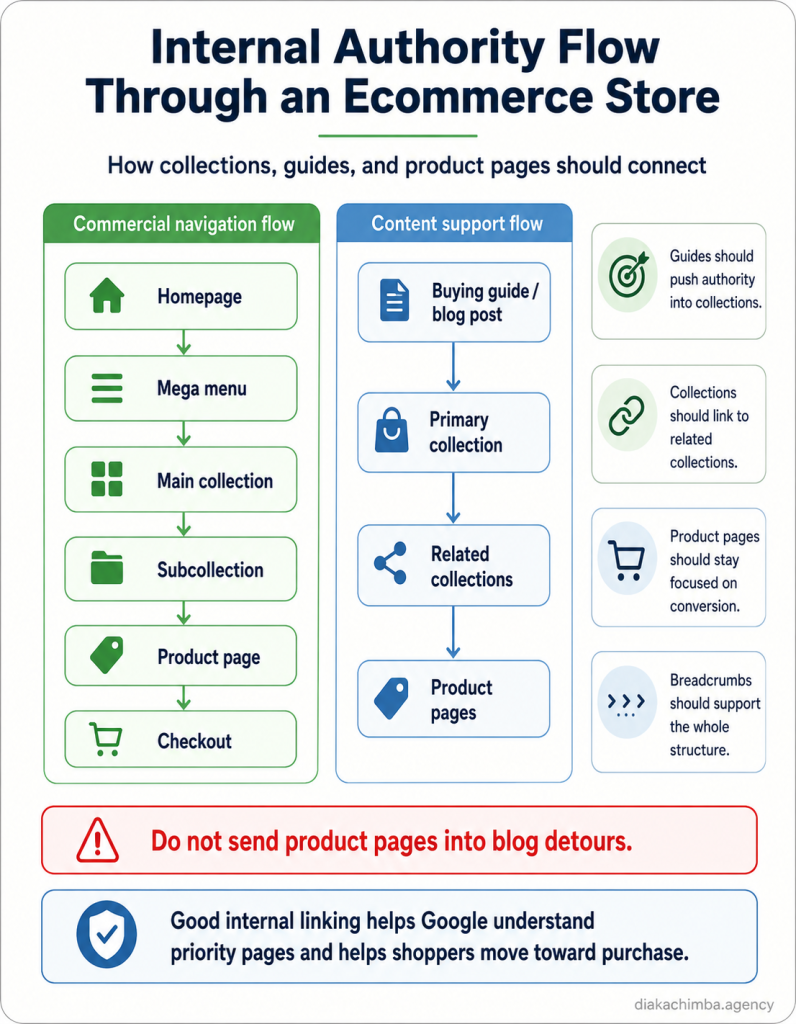
Internal links decide which commercial pages accumulate authority. Two flows describe how that authority should move.
Buying guide
↓
Primary collection
↓
Related collections
↓
Product pages
↓
Checkout
Homepage
↓
Mega menu
↓
Main collection
↓
Subcollection
↓
Product pageLink rules by page type
Blog and supporting content link to main collections, subcollections, relevant product pages, related guides, and comparison pages.
Collections link to parent categories, child collections, related collections, and buying guides where useful, and can feature high-priority products when the template supports it.
Product pages do not link outward editorially.
Breadcrumbs exist everywhere, following homepage to category to subcategory to product.
Where links live
Internal links surface through the mega menu, breadcrumbs, related-collection modules, "shop by" modules, buying-guide calls to action, blog body links, product cards, bestseller modules, and footer links reserved for evergreen commercial pages.
Anchor text mix
Use descriptive commercial anchors, and vary them so every link is not the same exact-match phrase. A healthy mix includes exact-match commercial anchors, partial-match anchors, natural product-type anchors, use-case anchors, and brand or product anchors.
Good anchors:
- "shop [category]"
- "[product type] for [use case]"
- "[attribute] [category]"
- "[brand] [product type]"
- "[category] buying guide"
Avoid: click here, learn more, this page, products.
Ecommerce Content Strategy
Blogs support the commercial architecture. Collections carry most of the commercial weight.
Picture a content team that publishes every week while traffic grows slowly and revenue does not move. When the posts get reviewed, most have no links to collections, no product modules, no buying path, and no role in the store's commercial architecture.
A guide about choosing running shoes should link to the running shoe collection. A guide about waterproof jackets should link to the waterproof jacket collection. The guide creates context, and the collection captures demand.
The content support model
For each main collection, build a small set of supporting assets that all link back into the commercial pages. Using office chairs as the example:
Main collection: office chairs
Supporting assets:
best office chairs for back painmesh vs leather office chairshow to choose an ergonomic office chairoffice chair size guideoffice chairs for small spaceshow long do office chairs last
Each of those links back to the office chairs collection, the ergonomic office chairs collection, the mesh office chairs collection, and the leather office chairs collection. The guides earn informational traffic and route it toward pages that convert.
Every guide needs a commercial path
A supporting guide should link to a collection, link to relevant products, use commercial anchor text, and avoid ending as a dead-end informational page. The test is simple.
If a post cannot support a collection, a product, an email capture, or a retargeting audience, it probably should not exist.
Planning the program this way doubles as authority flow, which is why mapping it through an SEO content strategy beats publishing on instinct.
Blog Consolidation and Content Pruning
Large stores accumulate blog debt. A CMO inherits 800 posts, most with no traffic, no links, no conversions, and overlapping intent.
This matters because a bloated blog can consume crawl attention while contributing nothing to product discovery. The answer is not another 100 posts, it is consolidating the useful content, redirecting weak duplicates, and rebuilding the system around commercial categories.
Each existing URL gets one of six decisions.
| Action | When to use it |
|---|---|
| Refresh | Ranking but outdated, or sitting on page two with intent mismatch |
| Consolidate | Two or more posts cover the same topic with split authority |
| Prune | No rankings, no traffic, no commercial value, no internal links |
| Redirect | A pruned page with inbound links, sent to the nearest relevant page |
| Keep as-is | Ranking, converting, or earning links |
| Internally link | Good content that is not connected to commercial pages |
For the harder calls, the decision sharpens around the specific signal:
| Scenario | Decision |
|---|---|
| Two posts rank for the same query | Merge |
| Old post has backlinks but no traffic | Redirect |
| Post has no traffic, links, or relevance | Prune |
| Post ranks but does not convert | Add commercial links |
| Post gets traffic for the wrong intent | Reposition or redirect |
| Post is outdated but valuable | Refresh |
The process that produces those decisions:
- Export every blog URL.
- Pull clicks, impressions, revenue assists, backlinks, and internal links.
- Identify posts with no traffic, no links, no conversions, and duplicate intent.
- Merge overlapping articles into the strongest version.
- Redirect removed posts to the nearest relevant URL.
- Update internal links to point at survivors.
- Link surviving guides to collections.
- Refresh strong posts.
- Remove the index bloat.
- Rebuild topic groupings around commercial categories.
Never bulk-delete blog content without first checking backlinks, historic clicks, assisted conversions, and internal links. A post with no recent traffic can still hold the links that support a commercial page.
One ecommerce SEO recovery case study cut a bloated blog from 800 URLs to 350, improving crawl efficiency and topical authority before scaling new content. Collection pages, not blog posts, became the primary traffic and revenue drivers after the cleanup.
Ecommerce Migrations
A migration looks successful when the site loads, checkout works, and orders are coming through. The SEO damage shows up later, when rankings fall because old URLs were not mapped, canonicals changed, collection copy disappeared, and thousands of product URLs now return errors.
Migrations cause more sudden ecommerce traffic loss than any other single event, because they break URLs, redirects, canonicals, and internal links all at once. Google notes that sitewide events like site moves can change crawl demand, which is part of why recovery takes deliberate work rather than waiting.
The recovery referenced throughout this guide began with a Magento-to-Shopify move that produced more than 10,000 404 errors, canonical conflicts, duplicate descriptions across roughly 1,200 product pages, collection pages with no SEO content, and broken internal linking. The fix sequenced cleanup before any new content shipped.
A migration that protects organic revenue runs through this checklist:
- Map every old URL to its new destination.
- Build and test the redirect map before launch.
- Validate canonical behavior by template.
- Preserve collection pages and their content.
- Preserve product URLs or redirect them precisely.
- Preserve titles, metas, and on-page metadata.
- Validate schema on the new templates.
- Regenerate and submit the XML sitemap.
- Update internal links to the new URLs.
- Confirm staging is noindexed and production is not.
- Run a full crawl immediately after launch.
- Monitor Search Console coverage and rankings daily for the first weeks.
The pages that earned rankings before the migration are the pages that need the cleanest redirect logic after it.
Ecommerce SEO by Platform
The core playbook is the same across platforms. The failure modes differ, so the watch list changes.
| Platform | Common issues | What to watch |
|---|---|---|
| Shopify | Canonical conflicts, app bloat, rigid URL structure, duplicate paths | Canonicals, theme speed, collection architecture |
| WooCommerce | Plugin bloat, tag and category duplication, thin product pages | Indexation rules, taxonomy cleanup |
| BigCommerce | Faceted navigation, duplicate parameters, theme speed | Crawl controls, category structure |
| Magento / Adobe Commerce | Complex layered navigation, pagination, crawl budget | Technical SEO, canonicalization, log analysis |
| Headless commerce | Rendering, internal links, metadata, schema hydration | SSR, crawlable navigation, structured data |
Shopify routes products through both /products/ and collection paths, which makes canonical behavior and duplicate product paths the first thing to check. App bloat and theme speed follow close behind, along with tag pages, internal search pages, limited URL control, collection metafields, product feed sync, and hreflang through Shopify Markets when selling internationally.
WooCommerce problems usually start with taxonomy. Product categories, tags, and attribute archives generate thin indexable pages, and plugin-generated schema can conflict with theme schema. Pagination, indexing rules in the SEO plugin, and hosting-dependent speed round out the list.
Magento and Adobe Commerce handle large catalogs but invite crawl traps through layered navigation and parameters. Parameter control, log file analysis, index bloat, canonical handling, pagination, and crawl efficiency on large catalogs are the recurring work.
Headless builds move the risk into rendering. Server-side rendering, hydration, metadata in the HTML, internal links present in the served markup, schema rendering, product grid crawlability, and staging indexation all need explicit checks, because API-driven content can render for users while staying invisible to crawlers.
Product Feeds, Merchant Center, and Structured Data
Search engines and AI systems both need clean product facts. Structured data delivers those facts on the page, and the product feed delivers them to shopping surfaces.
Google gives ecommerce stores two ways to provide product data: structured data on the page, Merchant Center feeds, or both, and the strongest setup uses both, with price, availability, shipping, reviews, and product identifiers aligned across the page and the feed.
Product pages should expose product name, brand, SKU or GTIN or MPN where applicable, description, images, price, currency, availability, condition, aggregate rating, reviews, shipping, returns, breadcrumb, and variant information.
Product feed SEO
The feed is its own optimization surface, and it feeds free listings as well as paid shopping. Work the feed across product title optimization, product type, Google product category, GTIN or MPN, brand, images, availability, price, sale price, shipping, returns, and product attributes, then check it against Merchant Center diagnostics.
This matters because conflicting price or availability data can reduce trust across shopping surfaces. If the feed says one thing and the page says another, search systems receive contradictory product facts, and contradictory signals cost visibility rather than build it.
Reviews, UGC, and Product Trust Signals
Reviews are not only a conversion lever. They are content, long-tail language, freshness, and the trust signal that search and AI systems weigh when deciding whether to surface a product.
A product with hundreds of recent reviews carries buyer language a manufacturer description never will, and that language often matches the long-tail queries shoppers actually type.
The work spans review schema, surfacing buyer language on the page, Q&A modules built from real support questions, photo reviews, review freshness, and moderation. Product-level FAQs sourced from customer support answer objections before they cost a sale.
The line that protects all of it: never use fake reviews. Beyond the policy risk, fabricated reviews give AI and search systems false signals that undermine the entity trust this section is meant to build.
Image SEO for Ecommerce
Images do more work in ecommerce than in any other vertical. They drive Google Images and Lens visibility, they affect page speed, and they are part of how a product gets understood.
The fundamentals are descriptive file names, accurate alt text, and proper compression. Serving modern formats like WebP or AVIF, using a CDN, and lazy loading non-critical images keep pages fast without hiding the images that matter.
Beyond performance, the catalog itself is a visibility asset. Multiple angles, clear product-detail shots, and lifestyle images give shoppers and image search more to match against, and an image sitemap helps discovery on large catalogs. Lazy loading should never hide the primary product image from crawlers or from a shopper landing above the fold.
AEO and GEO for Ecommerce
Answer engine optimization and generative engine optimization are layers inside modern SEO, not a separate service.
Google's AI optimization guidance states that AEO and GEO are terms for improving visibility in AI search experiences, but from Search's perspective, optimizing for generative AI features is still SEO. The work that earns organic rankings is largely the same work that earns AI citations.
The difference for ecommerce is that collection and product pages can include structured answer blocks that are easier for AI systems to interpret, summarize, and cite.
For collection pages:
Best for:
[Category] is best for [persona or use case] when [condition].

Key features:
Compare [feature 1], [feature 2], [feature 3], and [feature 4].

Common mistakes:
Avoid choosing on price alone. Check [attribute], [compatibility], and [return policy].
For product pages:
Who this product is for:
This product is best for [buyer type] who needs [use case].

Key specs:
[Spec table]

Compared with:
Choose this over [alternative] when [reason].
AI visibility comes from specific signals, and each one maps to a place on the site.
| Signal | Where it comes from |
|---|---|
| Product facts | Product page and feed |
| Trust | Reviews and third-party mentions |
| Category understanding | Collection copy |
| Comparisons | Buying guides |
| Entity confidence | Organization schema and citations |
| Freshness | Updated prices, availability, and reviews |
An AI system understands a product when the page states plainly what it is, who it is for, what it costs, whether it is in stock, how it compares, what customers say, and what category it belongs to. That is the same product data hygiene that feeds Google's structured data and Merchant Center signals, which is why AI visibility and search visibility move together rather than apart.
A few things to skip. Fake reviews, spammy manipulation, and llms.txt presented as a fix all fail, because they do not address the underlying signals these systems actually weigh.
Link Building for Ecommerce
Ecommerce sites need links because category pages compete with marketplaces, publishers, and larger brands that already hold authority.
This matters because ecommerce stores rarely lose on content alone. They lose because larger competitors have stronger authority pointed at the same category demand.
Different assets attract different links, so match the play to the asset.
| Asset | Link angle |
|---|---|
| Data study | Digital PR |
| Buying guide | Publisher and resource links |
| Product comparison | Affiliate and review links |
| Brand story | Founder and profile links |
| Supplier page | Manufacturer and supplier links |
| Tool or calculator | Passive links |
| Collection page | Direct links only when natural |
The practical plays that work for stores:
- Supplier and manufacturer "where to buy" or dealer links
- Unlinked brand mention reclamation
- Product review outreach
- Gift guide placements
- Niche edits into relevant buying guides
- Affiliate content placements
- Digital PR built on customer behavior data
- Broken link replacement for discontinued products and dead resources
- Competitor link gap analysis aimed at collection pages
- Links into guides that internally route to collections
The discipline that separates link building that moves revenue from link building that inflates a backlink count is internal routing. A linkable asset can earn authority, but internal links have to move that authority toward collections and products, so do not strand links on isolated blog posts.
CRO and SEO Overlap
SEO does not end at the click. A collection page that ranks but hides products, lacks filters, or creates doubt around delivery will leak revenue no matter how well it ranks.
The scale of that leak is well documented. Baymard's long-running checkout research puts the average cart abandonment rate at around 70%, which is why organic traffic cannot be judged on rankings or sessions alone.
The collection page is where most of this overlap lives. Product grid visibility, usable filters, sensible sort options, visible reviews, clear delivery and returns information, payment options, trust badges, accurate stock status, clean calls to action, and strong mobile UX all decide whether ranked traffic turns into orders.
Rankings create the opportunity. The collection, product, and checkout experience turn that opportunity into revenue, so ranking a page that cannot convert just buys expensive bounces.
How to Measure Ecommerce SEO
Traffic alone is the wrong scorecard. Measure organic revenue, the pages that drive it, and commercial visibility by template.
Rankings matter because they create visibility. Visibility matters because it creates product discovery. Product discovery matters because it creates sales. The KPIs below track that chain end to end.
Revenue KPIs: organic revenue, assisted organic revenue, revenue by landing page, revenue by collection, revenue by product page, organic conversion rate, average order value from organic, new customer revenue, repeat purchase contribution.
Search KPIs: non-brand clicks and impressions, collection-page and product-page clicks, ranking keywords by page type, indexed collection and product pages, pages receiving impressions, CTR by template.
Technical KPIs: index bloat, duplicate URLs, crawl errors, 404s, redirect chains, canonical conflicts, Core Web Vitals, crawl depth, orphan pages, sitemap and index coverage.
AI search KPIs: AI Overview appearances, LLM referral traffic, branded mentions in AI tools, product and category citation frequency, referral traffic from ChatGPT, Perplexity, Gemini, and similar sources.
Build reporting around page type
The reports that matter answer business questions, not vanity ones.
| Question | Report |
|---|---|
| Are commercial pages growing? | Non-brand clicks by collection |
| Are we making money? | Revenue by landing page |
| Is crawl waste shrinking? | Indexed URLs by template |
| Are guides helping? | Assisted revenue and internal links by guide |
| Are products discoverable? | Product impressions and clicks |
| Are AI tools finding us? | LLM referrals by landing page |
A page-type dashboard makes each template accountable to its own KPI. This lets the CMO see whether collection pages are growing revenue, whether product pages are converting, and whether blog content is supporting commercial pages.
| Page type | KPI |
|---|---|
| Collection | Revenue, non-brand clicks |
| Product | Revenue, conversion rate |
| Guide | Assisted revenue, links to collections |
| Blog | Internal link contribution |
| Filter URLs | Index bloat |
| Product variants | Duplicate risk |
| Discontinued products | Redirect and recovery value |
Test one change at a time
On pages that are not already ranking first, test single changes rather than rewriting everything at once, so you can attribute movement to a cause. Tools built for SEO split testing make this measurable across single pages, page groups, and redirect tests.
Worthwhile tests on ecommerce templates include collection intro placement, title tag formulas, below-grid copy, FAQ blocks, internal link modules, product description templates, schema additions, and related-collection modules. Change one variable, measure, then move to the next.
When you can show organic revenue by collection and CTR by template, budget conversations stop being about traffic and start being about return, which is the same logic the SEO ROI calculator is built around.
The same recovery referenced earlier saw daily organic clicks grow from 2,000 to 6,500, weekly revenue grow from $15K to $55K, and AI and LLM-driven traffic grow by roughly 4,000% over ten months. That last number shows what happens to AI visibility when the underlying content and technical signals are strong.
How to Prioritize Ecommerce SEO Work
A backlog of fixes and collections is useless without an order, and leadership wants to know what gets done first and why.
Score every opportunity across the factors that predict speed and size of return:
- Revenue potential
- Margin
- Search demand
- Ranking gap
- Technical dependency
- Inventory stability
- Content effort
- Link requirement
- Time to impact
The work that scores high on revenue and demand while scoring low on effort and link requirement goes first. A priority collection on an already-strong domain can move in weeks, while a head term in a marketplace-dominated results page is a quarter-long investment, and the sequence should reflect that.
This is how the backlog becomes a commercial plan. The CEO can see what gets fixed first, what it should affect, and why the sequence matters.
A 90-Day Ecommerce SEO Roadmap
Ninety days is enough to diagnose the site, fix the base, build the collection architecture, and start the authority flow. The sequence matters more than the speed.
Days 1 to 15: Diagnosis
- Crawl the site
- Pull Search Console, GA4, and Merchant Center diagnostics
- Export sitemap URLs and indexed URLs
- Segment URLs by template
- Identify top revenue pages and non-brand winners
- Identify crawl waste and duplicate templates
Days 16 to 30: Technical cleanup
- Fix critical 404s and redirect chains
- Correct canonicals by template
- Control internal search and filter URLs
- Fix pagination
- Clean the sitemap
- Remove low-value indexable URLs
- Fix schema errors
Days 31 to 60: Collection buildout
- Build the keyword-to-collection map
- Optimize priority collections and create missing ones
- Add above-grid copy and below-grid content
- Add related collection links
- Update the mega menu
- Rewrite priority product descriptions
Days 61 to 90: Authority and scale
- Publish buying and comparison guides
- Consolidate blog debt and redirect duplicates
- Build internal links into priority collections
- Launch link acquisition
- Track revenue by page type and monitor indexation
- Test templates and refresh based on Search Console query data
Ecommerce SEO Checklist
A scannable version of the full system for ongoing reference.
- Technical crawl completed
- Indexation reviewed by template
- Canonical conflicts fixed
- Pagination crawlable
- Faceted navigation controlled
- XML sitemap clean
- Broken links and redirect chains cleaned
- Product schema implemented
- Merchant listing data and product feed checked
- Duplicate product descriptions rewritten
- Out-of-stock and discontinued products handled
- Product variants consolidated or split correctly
- Priority collections optimized
- New collections mapped from keyword research
- Collection cannibalization checked
- Mega menu updated
- Above-grid copy added
- Below-grid content added
- Collection FAQs added
- Related collection links added
- Product pages improved
- Blog content consolidated
- Supporting guides linked to collections
- Reviews and UGC surfaced with schema
- Image SEO addressed
- Organic revenue tracking configured by page type
- AI and LLM traffic tracked
- Link acquisition plan active
Ecommerce SEO FAQs
Ecommerce SEO is the work of improving an online store's organic visibility so shoppers can discover, evaluate, and buy products through search engines and AI-assisted search. It spans technical SEO, collection and product page optimization, internal linking, content, structured data, and revenue measurement.
Organic search reaches shoppers during the research they do before they buy, which lowers dependence on paid ads. The traffic compounds over time, and well-built collection pages keep producing product discovery and sales long after they are published.
Collection, category, subcategory, and high-intent product pages carry most of the commercial value. Buying guides, comparison pages, and review pages support them by capturing earlier-stage demand and routing it toward commercial pages.
Both matter, but collection pages usually scale better because they target broader commercial demand and match how most shoppers search. Product pages convert and capture exact-match, brand, model, and long-tail searches.
A workable structure is roughly 100 words above the product grid and at least 1,000 words below it when the category has enough commercial depth. The short intro confirms relevance, and the longer content answers buying questions without burying products.
Generally no. Keep product pages focused on conversion, and use blog posts and guides to link into collections and products instead, so internal authority flows toward the pages that make money.
Rewrite priority products with unique descriptions, then add specs, reviews, FAQs, use cases, and comparison points. Manufacturer copy creates duplication and gives search and AI systems nothing distinctive to rank or cite.
Only when the combination has real search demand, unique intent, stable inventory, unique metadata and content, and commercial value. Everything else should be noindexed, canonicalized, or blocked to avoid index bloat.
Keep temporarily out-of-stock pages live with restock and alternative information, 301 discontinued products to a replacement, and keep discontinued pages with links or traffic live with clear alternatives. Only remove pages that have no traffic, links, or replacement.
No. AI search visibility is a layer inside modern SEO, and it depends on the same signals: clear content, structured data, entity consistency, reviews, accurate product data, and authority.
Technical fixes can affect visibility quickly. Collection and content expansion compounds over months, and competitive categories require sustained authority building before they reach strong positions.
Find the Organic Revenue Hiding in Your Store
If paid ads are carrying revenue while your collection pages, product pages, and buying guides underperform, the fastest next step is finding which layer is broken.
Request an ecommerce SEO opportunity analysis