

Table of Contents
- The Four Stages a Page Has to Pass Through
- Stage 1: Is the Page Even Discovered?
- Stage 2: Can Google Actually Get In?
- Stage 3: Did Google Choose Not to Index It?
- Stage 4: Which URL Did Google Actually Pick?
- Common Mistakes That Make These Problems Worse
- A Worked Example
- How This Connects to the Rest of the Build
- FAQ
- Not Sure Which Stage Your Pages Are Stuck At?
“My page isn’t showing up in Google” isn’t one problem.
It’s usually one of four different problems, and each one has a different fix. Diagnose the wrong one, and you can spend weeks changing something that was never broken, or worse, make a page permanently disappear by fixing a problem it didn’t actually have.
Before touching robots.txt, adding a noindex tag, or rewriting a canonical, you need to know which stage Google actually got stuck on.
That’s what this framework is for. It’s a diagnosis, not a fix-everything checklist, and a few of the fixes below have a real blast radius if applied to the wrong page. We’ll flag those as we go.
The Four Stages a Page Has to Pass Through
Google doesn’t index a page in one step. A URL moves through a sequence, and it can get stuck at any point in it:
- Discovery. Does Google know the URL exists at all?
- Crawl access. Is Google actually allowed to fetch and read the page?
- Indexing decision. Having read the page, did Google decide it was worth adding to the index?
- Canonical resolution. If similar pages exist, which one did Google choose to treat as the authoritative version?
These are genuinely different failures.
A discovery problem means Google doesn’t know your page exists.
A crawl-access problem means Google knows it exists but can’t get in.
An indexing problem means Google got in, read the page, and decided not to keep it.
A canonical problem means Google indexed something, just not the URL you meant to be indexed.
The fix for one does nothing for another, which is why “just resubmit the sitemap” or “just add noindex” so often fails to move the needle.
Stage 1: Is the Page Even Discovered?
Start here.
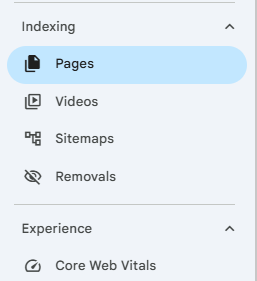
In Google Search Console’s Page Indexing report, look for Discovered – currently not indexed.
This status means Google is aware the URL exists but hasn’t crawled it yet. It’s a queue problem, not a quality problem.
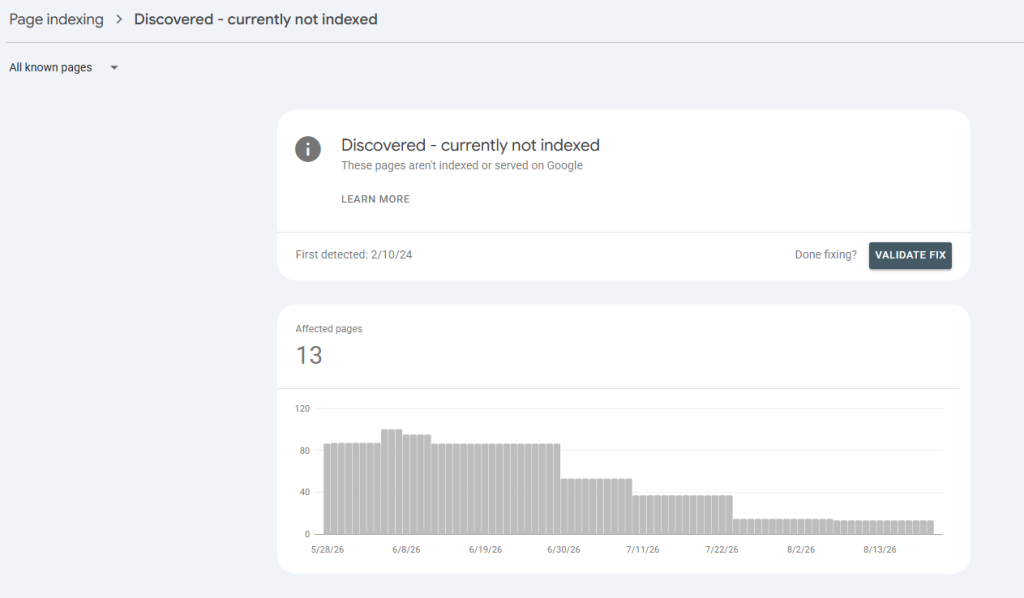
Check these first:
- Is the URL in your sitemap? If it’s a genuinely important page, it should be.
- Does anything on your site actually link to it? A page with no internal links pointing to it is an orphan. Google may find it eventually through the sitemap alone, but internal links are what tell Google the page matters enough to prioritize.
- Is this happening on a small number of low-priority pages, or a pattern across important ones? A handful of thin or low-value URLs sitting in this state is normal and usually needs no action. A rising count on pages that should matter is worth investigating further.
Confirm the current state in URL Inspection before acting.
Search Console’s reports lag behind reality, and a URL flagged here may already have been crawled since the report was generated.
Stage 2: Can Google Actually Get In?
If a page has been crawled, or if it’s stuck at “Discovered” for reasons beyond a queue delay, the next question is whether Google can physically access it.
Check robots.txt first, and understand what it actually controls.
This is the single most common point of confusion in this whole diagnosis: robots.txt controls crawling, not indexing. A page disallowed in robots.txt can still get indexed if enough other signals, like external links, point to it. It just shows up with no title or description, because Google was never allowed to read the content.
That status is called Indexed, though blocked by robots.txt, and it looks like an indexing problem but is actually an access problem with the opposite symptom.
A noindex line inside robots.txt does nothing. Google stopped honoring that syntax in 2019. If you want a page out of the index, the noindex directive has to live on the page itself, in a meta tag or an HTTP header, and Google has to be allowed to crawl the page to see it.
Blocking a page in robots.txt while also expecting a noindex tag on it to take effect is a contradiction. Google can’t read a tag on a page it isn’t allowed to visit.
Check for server errors. Repeated 5xx errors or timeouts during Google’s crawl attempts will stall a page here regardless of robots.txt.
A caution on crawl budget. You’ll see crawl budget mentioned constantly in diagnostic checklists. For most lean-team sites, sites in the range of a few hundred to a few thousand pages, it’s rarely the actual bottleneck.
Google’s own guidance is that crawl-budget management mainly matters for very large or extremely frequently updated sites.
If you’re diagnosing a small-to-mid-size site, look at access and quality signals before assuming crawl budget is the constraint. Don’t let a large site’s problem get imported into a small site’s diagnosis.
Stage 3: Did Google Choose Not to Index It?
If Search Console shows Crawled – currently not indexed, Google successfully fetched the page and made a judgment call not to include it. This is a quality and evaluation issue, not an access issue, and it’s the stage most resistant to a quick fix.
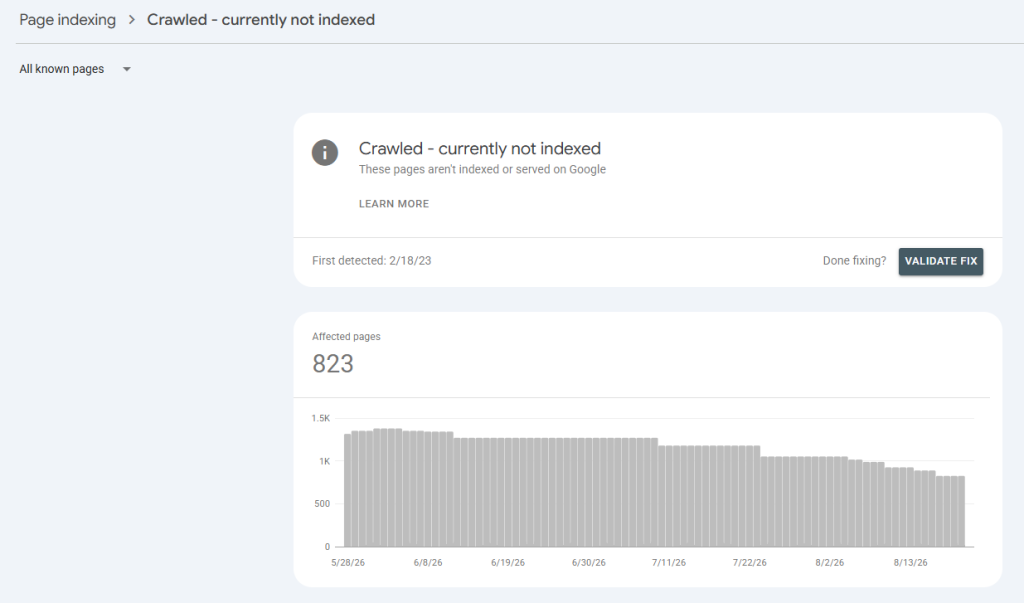
Common causes:
- The page is thin, or largely duplicates content that already exists elsewhere on the site.
- Internal linking doesn’t signal that the page is important. A page only reachable via the sitemap, with no contextual links pointing to it, reads to Google as lower priority than pages woven into the site’s actual structure.
- A near-identical page already satisfies the same query better, and Google is treating this one as redundant rather than distinct.
Be cautious about requesting indexing as a first move. Manually requesting indexing without changing anything about the page rarely accelerates inclusion, and can sometimes delay Google’s next natural reassessment of it.
Fix the actual gap first: expand or differentiate thin content, strengthen internal links from pages Google already values, consolidate genuine duplicates. Request indexing after the page has changed, not instead of changing it.
Pages can sit in this state for weeks or months.
That’s expected.
It resolves as Google reassesses the page and the site around it, not on a fixed timeline.
Stage 4: Which URL Did Google Actually Pick?
If multiple URLs on your site could plausibly serve the same query, home page and a duplicate with a trailing slash, HTTP and HTTPS versions, a parameterized URL and its clean equivalent, Google has to decide which one is canonical. Your canonical tag is a strong signal, not a directive Google is obligated to follow.
Three statuses show up here, and they mean different things:
- Duplicate without user-selected canonical. Google found duplicate or highly similar content and no clear canonical signal was given. Usually fixed by adding canonical tags or consolidating the pages with a redirect.
- Duplicate, Google chose different canonical than user. You specified a canonical, and Google picked a different URL anyway. Use URL Inspection to see which URL Google chose, then decide: is Google actually right, or do your internal links, sitemap entries, and content structure need to point more consistently at the URL you intended?
- Alternate page with proper canonical tag. This one usually isn’t a problem. It means the tag is working exactly as intended, the non-canonical version is correctly deferring to the canonical one.
The check that catches most of these: internal links pointing to the “wrong” URL are one of the most common reasons Google overrides a stated canonical. If your own site links to the non-canonical version in navigation, footers, or related-content modules, you’re sending Google a stronger signal against your own canonical tag than the tag itself provides. Audit where your internal links actually point before assuming the canonical tag alone will settle it.
The mistake to avoid here specifically: don’t block a duplicate URL in robots.txt as a way to “solve” a canonicalization problem. If Google can’t crawl the page, it can’t see the canonical tag on it either, and you’ve traded a duplicate-content signal for a lost-signal problem that’s harder to diagnose later.
Common Mistakes That Make These Problems Worse
A few patterns show up repeatedly, and each one is worth checking for directly before you conclude a fix isn’t working.
- Conflicting directives on the same page. A page carrying both a noindex tag and a canonical pointing to a different URL is telling Google two contradictory things at once. Pick one signal.
- Robots.txt blocking a page you’re trying to noindex or canonicalize. Covered above, but worth repeating: both of those directives require crawl access to function.
- Mass redirects applied without checking equivalence. Redirecting a batch of URLs to a single destination because they’re “similar enough” can consolidate pages that actually served different search intents, which trades one problem for a worse one.
- Treating “not indexed” as one bucket. The four stages above have different root causes and different fixes. Applying a Stage 2 fix (robots.txt) to a Stage 3 problem (content quality) won’t do anything, and can make the actual diagnosis harder to see later.
If a fix touches robots.txt, redirects, or a template used across many URLs, get whoever owns the CMS or the codebase involved before changing it.
A misconfigured disallow rule or a redirect rule matched too broadly can affect far more of the site than the one page you were trying to fix, and that kind of mistake is far more expensive to undo than the original indexing issue.
A Worked Example
A B2B services page stops showing up in search after a site migration. In Search Console, it shows Crawled – currently not indexed.
Working through the stages: Discovery isn’t the issue, Google clearly reached it. Crawl access isn’t the issue either, robots.txt allows it and there are no server errors on the URL.
That leaves Stage 3, an evaluation problem, and Stage 4 worth checking too.
URL Inspection shows Google is treating a different, older URL as canonical, one that no longer exists post-migration and wasn’t updated during the move.
That’s the actual root cause: internal links across the site still point to the old URL, the sitemap wasn’t regenerated after migration, and Google’s evaluation of the new page is being suppressed by conflicting canonical signals left over from before the change.
The fix is updating internal links and the sitemap to point consistently at the new URL, not requesting indexing repeatedly on the new one.
How This Connects to the Rest of the Build
None of the architecture decided earlier in a build matters if Google can’t actually process the pages that hold it.
A cluster mapped correctly and a brief written precisely still fail if the resulting page gets stuck at Stage 2 or Stage 4. This diagnostic sits underneath the rest of the work, not beside it.
This is the discipline behind our technical SEO work: finding which stage a page or a site is actually stuck at before recommending a fix, rather than applying a generic technical checklist to every symptom.
It showed up directly in a higher education client’s recovery, where cleaning up and properly resolving roughly 90,000 URLs preceded a 200% increase in organic traffic and a 30% increase in leads, the content and keyword work only started paying off once the underlying indexation problem was actually fixed.
A wildlife control company’s recovery followed the same order: full indexation recovery came first, and the 200 to 300% traffic increase and 80% increase in inbound calls followed from there, not the other way around.
If you’re not sure whether what you’re seeing is a real problem or normal noise, our SEO audit is built to answer exactly that question before anyone touches robots.txt or a template.
FAQ
Is a small number of pages stuck in “Discovered – currently not indexed” something to worry about?
Usually not. A handful of low-priority URLs sitting in this state is normal. It becomes worth investigating when the count is rising, or when it’s happening to pages that should genuinely matter to your site.
Should I use “Request Indexing” every time I see a page isn’t indexed?
No. It’s most useful after you’ve actually changed something, expanded thin content, fixed a broken canonical, corrected internal links. Using it repeatedly on an unchanged page rarely speeds things up and can push back Google’s next natural evaluation of it.
Can I just block duplicate pages in robots.txt to solve a canonicalization problem?
No, and this is worth being direct about: blocking a page prevents Google from reading anything on it, including the canonical tag that would have resolved the duplication cleanly. Use canonical tags or a redirect instead, and reserve robots.txt for pages you genuinely don’t want crawled at all.
How long should I wait before deciding a fix didn’t work?
Indexing and re-evaluation aren’t instant. Pages can take weeks to reflect a fix. Use URL Inspection to confirm the underlying issue, quality, access, or canonical signal, was actually corrected before concluding the fix failed.
Not Sure Which Stage Your Pages Are Stuck At?
If you’re seeing indexing problems and aren’t sure whether it’s a discovery, access, quality, or canonical issue, that’s exactly the kind of diagnosis worth getting right before making changes.
Book a strategy call and we’ll help you find out which stage is actually broken.